Your own version
Your own Hevy-style lifting log on your iPhone
Hevy is a free gym log with a social side: you record every set and follow friends and athletes in a feed. If you'd rather have a log with no feed and keep only the numbers you care about, describe your routine to Borel. It writes a native lifting log in Swift that shows last session beside each set, on your own iPhone.
Updated . Borel isn’t connected to Hevy.
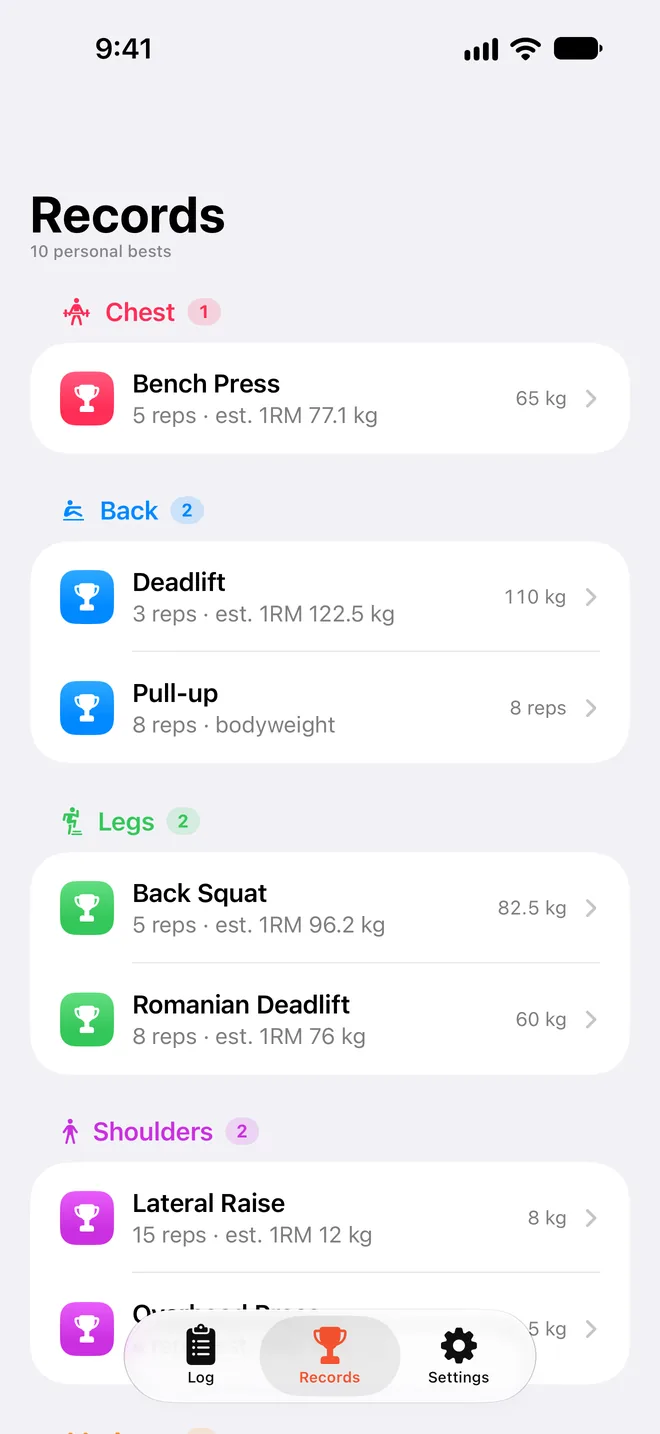
“A lifting log just for me. I build routines from my own list of exercises. During a workout each set shows last session's weight and reps beside it; I log weight, reps and a label: normal, warm-up, drop or failure. A rest countdown starts when I tick a set. A body screen keeps body weight, two measurements and a monthly photo. Flag a personal record when a set beats my heaviest for that exercise, and graph each lift's heaviest set by month.”
About Hevy
What people like about Hevy
In our words, from what Hevy says about itself.
- Free with no ads, with last session's weights and reps shown for every exercise.
- Supersets, drop sets, warm-ups and failure sets logged alongside regular sets, with automatic rest timers.
- A feed of friends' and athletes' workouts, and graphs and personal records for each exercise.
On the App Store, Hevy is free to download with no ads. The listing shows two Hevy Pro monthly purchases, $2.99 and $3.99, a yearly one at $23.99 and a lifetime one at $74.99.
Prices checked on .
Made for you
What your own lifting log can do
What the prompt above builds, and what you can change by asking Borel in plain words.
Last time, right there
Each set row shows what you lifted in the previous session, so you know the number to beat.
Sets with a label
Mark a set as warm-up, drop or to failure, and the graphs can leave warm-ups out.
Your body's numbers
Body weight, a waist or arm measurement and a monthly photo, on one timeline beside the lifts.
Records you define
Heaviest set, most reps at a weight or biggest session, flagged with a haptic the moment it happens.
Said plainly
How it's different
- There's no feed, followers or comments: nobody sees your workouts.
- It has no exercise library with videos and no program written for you; the exercises and routines are the ones you enter.
- There's no Apple Watch app, and it doesn't measure your heart rate.
- Your app isn't Hevy and won't look or work like it: it has only what you ask Borel to build, and none of Hevy's own content.
- Your data stays in your own app: on your iPhone by default, or in your app's own database in Borel's cloud if you add accounts.
How to get yours
From the prompt to your home screen
- 1
Start from the prompt
Change anything in it first: names, rules, screens. Borel asks what it needs to know, then writes the app in Swift and SwiftUI.
- 2
Use it in your browser
It opens in a live iPhone simulator streamed from Borel's Mac, at no cost. Building starts free, with 5 free credits a day, up to 30 a month.
- 3
Keep it on your iPhone
With Pro, from $25 a month, Borel Companion installs it with a free Apple ID, up to 3 apps at a time, and renews each one every 7 days while it runs.
Frequently asked questions
Not to save money: Hevy is free, and Hevy Pro costs less per month than Borel Pro. Keeping a log you made on your iPhone comes with Pro, from $25 a month. Make your own when you want a log with no feed, with exactly the fields and graphs you train by.
Yes. Every set row carries the weight and reps from the previous session of that exercise.
Yes. Name the measurements you want, and each gets its own line on a graph beside your body weight.
It can draft a routine from a description, through the AI included with Borel apps. Treat that as a starting point and check it with a coach; it isn't a trainer that adapts to you.
Make your own lifting log
Start from the prompt on this page and change it until it's yours. Borel builds it while you watch.