Your own version
Your own Goodbudget-style envelope budget on your iPhone
Goodbudget puts the paper-envelope method on a phone: money goes into envelopes, and you spend from them until they're empty. If you budget alone and want every envelope you can think of, describe yours to Borel. It writes a native envelope budget in Swift, with a payday fill and all your past months, kept on your iPhone behind Face ID.
Updated . Borel isn’t connected to Goodbudget.
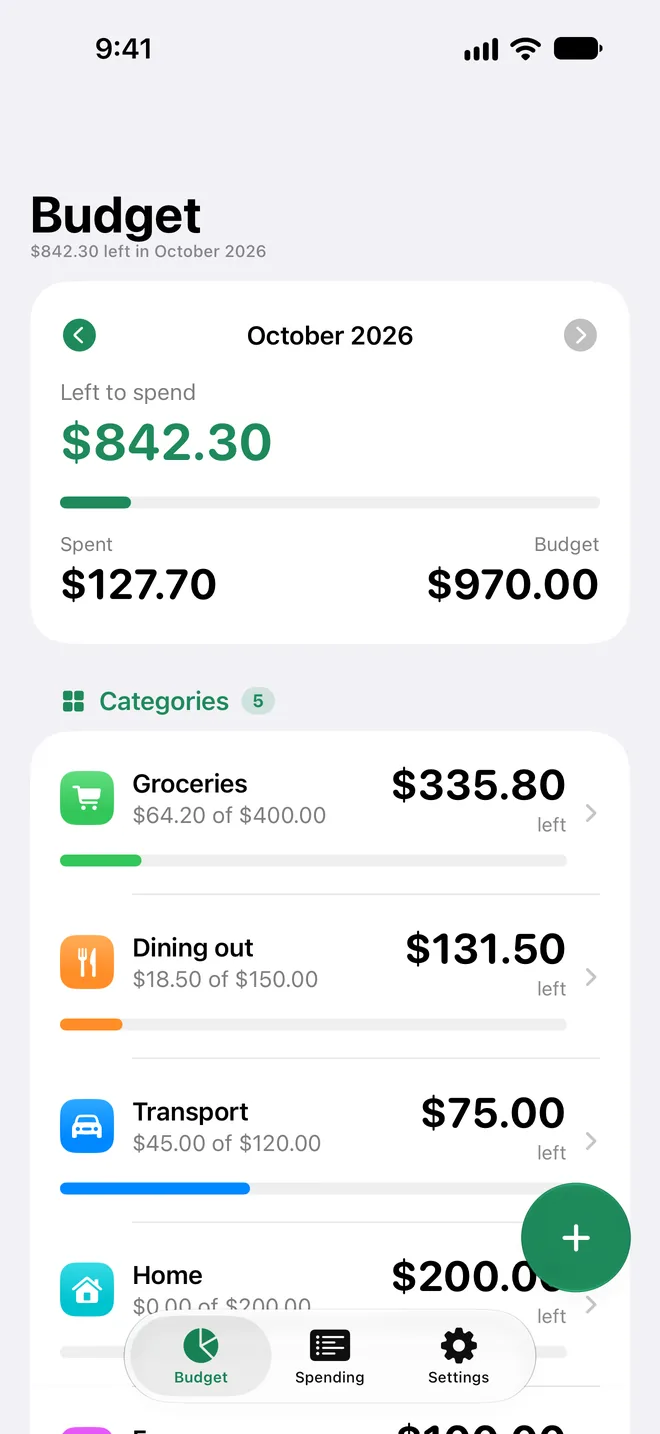
“An envelope budget. I create envelopes with a monthly amount, such as groceries 400 and fun 150, plus yearly envelopes for bills like insurance that fill by a twelfth each month. A Fill button on payday tops them all up. I log a spend by picking an envelope and typing an amount; each envelope shows a bar of what's left and turns red when it's empty. I can move money from one envelope to another. A history screen lists every month. Lock with Face ID.”
About Goodbudget
What people like about Goodbudget
In our words, from what Goodbudget says about itself.
- The envelope method, with money set aside for each purpose before it's spent.
- A free plan with 20 envelopes in all, one account, two devices and a year of history.
- Budgets that sync and can be shared, and debt tracking on both plans.
Goodbudget's Free plan is $0 with 10 regular and 10 more envelopes. Premium is $10 a month or $80 a year and adds unlimited envelopes, bank sync for US banks and 7 years of history.
Prices checked on .
Made for you
What your own envelope budget can do
What the prompt above builds, and what you can change by asking Borel in plain words.
Envelopes without a count
Groceries, the dog, birthdays, the car's next service: add one whenever a new purpose turns up.
Payday in one tap
A fill that tops every envelope up to its amount, or adds to what's left, as you prefer.
Yearly envelopes
Set aside a twelfth of the insurance bill each month and watch that envelope grow until it's due.
Every month you've kept
Scroll back through all your months; nothing is trimmed after a year.
Said plainly
How it's different
- It doesn't sync with a bank; every spend is typed in.
- It's on one iPhone, so a partner can't spend from those envelopes on their phone.
- There's no website for opening the budget on a computer.
- Your app isn't Goodbudget and won't look or work like it: it has only what you ask Borel to build, and none of Goodbudget's own content.
- Your data stays in your own app: on your iPhone by default, or in your app's own database in Borel's cloud if you add accounts.
How to get yours
From the prompt to your home screen
- 1
Start from the prompt
Change anything in it first: names, rules, screens. Borel asks what it needs to know, then writes the app in Swift and SwiftUI.
- 2
Use it in your browser
It opens in a live iPhone simulator streamed from Borel's Mac, at no cost. Building starts free, with 5 free credits a day, up to 30 a month.
- 3
Keep it on your iPhone
With Pro, from $25 a month, Borel Companion installs it with a free Apple ID, up to 3 apps at a time, and renews each one every 7 days while it runs.
Frequently asked questions
As many as you make. A budget you built has no free and paid tiers, so nothing caps the count.
Yes. Say whether leftovers stay put, return to a common pot or move to savings, and the fill follows that rule.
No. A Borel app can't yet share a budget between two people, so the envelopes stay on your own iPhone.
No. Goodbudget has a free plan, and its Premium costs less than Borel Pro, per month and per year. Putting a budget you made on your iPhone comes with Pro, from $25 a month, and that plan covers every app you make.
Make your own envelope budget
Start from the prompt on this page and change it until it's yours. Borel builds it while you watch.